
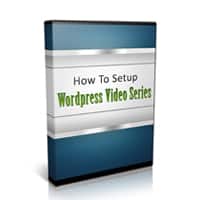
How to Setup WP Videos
FREE
Only registered users can download this free product. Please Register HERE
If you’ve ever struggled to install WordPress yourself, you know it’s far from the “one-click” miracle everyone promises. Now imagine trying to show a client or friend—and explaining why the Publish button becomes Update after you hit it once.

Let alone the difference between a post and a page, what plugins actually do, or which ones to install first. It’s enough to make anyone tear their hair out.
Yes, YouTube has tutorials, but you need to know exactly what to search for—and hope the video shows the current version of WordPress, not an outdated one with different menus and options.
Now imagine having over 68 minutes of crystal-clear, “over-my-shoulder” videos that walk you through the entire WordPress installation process from scratch. And here’s the best part: this is a digital download with full PLR/MRR rights. That means you can sell it, give it away, or use it as your own training material—just like a pro.
Video 1 covers the pre-installation essentials: choosing a username other than the default “admin” (the number-one target for hackers), plus other security basics.
Video 2 comes in two versions—one for Fantastico and one for Softaculous, the two most popular one-click installers used by hosting providers.
Video 3 shows you how to clean up whatever the auto-installer missed. Automatic installs are often behind on updates—this video fixes that.
Video 4 moves into settings tweaks and the initial look of your WordPress blog, including removing unnecessary default widgets.
Video 5 walks through the 9 plugins I install on every new WordPress site: from a contact form to Yoast’s SEO plugin and many more.
And that’s just the beginning…
| LICENSE: | |
|---|---|
| FILE SIZE (MB): | 81.3 |
| PRODUCT TYPE: |
Related products
E-Business PLR

Cooking PLR

E-Business PLR

E-Business PLR


Entertainment PLR
Diet PLR

Christian Books PLR


